Signs you're paying for subscriptions you don't use
You've built the list already, or you're about to, using How to find hidden subscriptions. Now comes the harder part: deciding whether each charge still earns its price. Subscriptions bill whether you use them or not. Some are probably still giving you some value. Here are the signs worth checking against your list.
You can't remember the last time you used it
Start here; it's the plainest test. If nothing comes to mind, check the service's own account page: it often shows a watch history, a listening history, or a last sign-in date. A blank history is a real answer. A few subscriptions (a cloud backup, a password manager, a domain) do their job without ever being opened. For those, going unopened doesn't settle anything; the real question is whether it's still doing its job.
You had to look up what the charge was
If a line on your statement made you stop and search what it was, that's worth a second look. How to find hidden subscriptions covers decoding a cryptic merchant name. A charge you can name without help is at least one you know about; one you had to hunt down might have been billing you unnoticed for a while.
It started as a free trial
A free trial that quietly turned into a paid plan is simple to lose track of. Look for the first charge matching the subscription's price: if it lines up with when the trial would have ended, that's likely how it happened. A trial that converted before your statements start won't show a first charge at all, so check the service's own billing page too, which often holds a longer history. Either way: are you still using what the trial talked you into?
You're paying twice for the same thing
This shows up a few ways: two services doing the same job, a service already bundled into your phone or internet plan, or two household members each covering the same charge separately. That last one is hardest to catch alone, since your statement only shows your side; it takes comparing lists with your household to notice. Once you do, it's a plain call: one subscription covers the job.
The price went up since you signed up
Streaming services, software, and gym memberships can raise prices quietly, a few dollars at a time. Line up the charge against an earlier statement or the service's billing history. A monthly charge shows the pattern within a few months. An annual one needs last year's charge to compare against. A jump from $9.99 to $13.99 is worth a look: does the price still match what you get?
You're on a bigger plan than you use
Some plans come in tiers: family versus individual, more storage than you fill, features you never open. Check what you're on against what the tier includes and how much you actually use. Four streaming profiles with one in use, or storage well past what you've filled, can mean a smaller plan covers the same use for less.
The reason you signed up is over
A project wrapped, a season ended, a class finished, and the subscription that made sense for it kept billing anyway. It might be software for a hobby you moved on from, a meal kit for a busy month that's passed, or streaming for a show you've finished. If the reason is gone, the charge is worth revisiting even if you liked it while it lasted.
Keep, cancel, or decide later
Each charge gets one of three calls. Keep it, which includes moving to a smaller plan; the subscription stays, sized to what you use. Cancel it with whoever actually bills you. That's the service itself, the app store if you subscribed there, or your phone or internet provider if the charge rides inside a bundle. Or pick a date to decide later, for a trial you want to see through or a renewal worth reconsidering closer to the date.
Check your next statement after canceling to confirm the charge is gone; some services take a cycle to drop off. Then notice what happens: every charge you cancel is money that stays in your pocket every cycle from here on.
Where Unspending Spree fits
These signs are judgment calls only you can make; we can't tell whether you still use a service. What we can do is build the list and track it. Connect your bank through Plaid, upload a statement (PDF, CSV, or photo), or forward statement emails, with the file attached, to your personal import address. We scan for recurring charges on weekly, monthly and quarterly cycles, and surface the ones you may have lost track of. Annual ones you add yourself.
Once subscriptions are found, we track them over time. See each subscription's price history and spot increases, with contract end dates flagged 60 days out. Invite your partner or family: everyone in the household sees the same accounts, debt, subscriptions, budget, and progress.
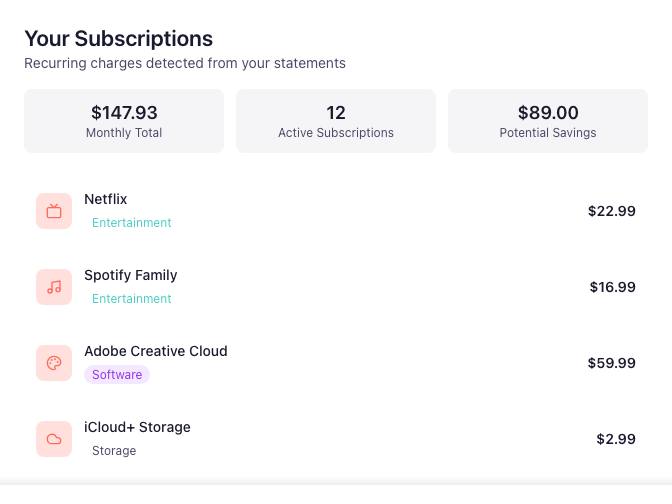
The decision step has a name inside the app too: the Unspending Spree. Go through each subscription one by one and decide: keep, cancel, or defer with a note and a date. See savings you've committed to versus savings actually achieved, and run another spree anytime new subscriptions turn up. Each find shows how confident we are, and nothing happens to a subscription until you decide.