How to find hidden subscriptions
Find the subscriptions that are still quietly billing you, including the ones a single glance at a statement won't catch. Sounds straightforward. It gets tricky fast. A statement sorted by date makes it harder to find repeated transactions. Something you pay $9.99 per month for might only show up once per statement anyway, and if it's there twice it's probably at the beginning and the end. Noticing patterns is harder that way. Here's a method that works with nothing more than your statements and a spreadsheet.
1. Pull every statement
One card, one month, won't show you a pattern. Recurring charges live in the history. Gather at least six months of transactions, enough to see a quarterly charge twice. Include every account money leaves from: checking, each credit card, anywhere you pay from. A subscription billed to a card you stopped checking regularly is still a subscription.
2. Sort by merchant
Statements list transactions by date, which is the wrong order for spotting a repeat. Download your transactions as a CSV (if your bank or card issuer offers it) and sort alphabetically by description instead. Repeats now sit next to each other, so a charge that lands every few weeks stands out instead of getting lost between a grocery run and a gas fill-up.
3. Match the charge to a cycle
Once similar charges are grouped, check the gap between them. About every 7 days is weekly, every 28 to 31 is monthly, every 90 or so is quarterly. Annual charges are the ones that slip through: one line, once a year, simple to mistake for a one-time purchase. Scroll back a full 12 months if your statements go back that far, since a charge from last January won't appear anywhere in a spring or summer statement.
4. Put the yearly ones on your calendar
Step 3 already flagged the yearly charges that slip through. Two more places leave a trace of them. Search your email for words like "renewal," "annual," or "receipt," since a confirmation often lands there when you sign up. If you subscribed through a phone, check the app store's subscription list, which usually shows the next renewal date.
For each yearly charge you find, write down the amount and the renewal date. Some services send a reminder before they bill you. Set your own too, a couple of weeks ahead of the date. That gives you time to keep it, cancel it, or revisit it later before the charge lands.
Divide the yearly price by 12. That puts it on the same scale as your monthly charges, so you can compare them side by side.
5. Translate the cryptic merchant name
Payment processors often print their own name ahead of the company you actually paid. In "SQ *COFFEE AUSTIN TX", the "SQ" is Square, and the coffee shop comes after it. Search unfamiliar descriptors, and check the charge amount against what the service actually costs with tax added; a match is a good clue that you're looking at the right line.
6. Watch for price creep
A subscription doesn't have to be new to be worth a second look. Line up the charge amount for the same merchant across several months. Say a streaming service starts at $9.99, creeps to $12.99, then $14.99: same subscription, quietly getting more expensive, no new sign-up required. Comparing three or four charges side by side surfaces that pattern in a way a single statement never will.
7. Decide, then act
For each recurring charge, land on one of three calls: keep it, cancel it, or revisit it later. Later works for a trial you want to see through, or a charge you'd rather reconsider closer to renewal. To cancel, contact the service through its app, its site, or its support line. If you subscribed through an app store, cancel in the store's subscription settings instead. Whoever billed you is the one who can turn the billing off. Note what you decided and when, so next month isn't spent solving the same charge twice.
Where Unspending Spree fits
The method above works with a spreadsheet and some patience. Unspending Spree does the pulling, sorting, and matching for you. Connect your bank through Plaid with read-only access, or upload a PDF, CSV, or photo statement. You can also forward a statement email, with the file attached, to your personal import address. Either way, it scans your transactions for recurring charges on weekly, monthly, and quarterly cycles. (Annual ones you still add yourself.) Cryptic merchant names get resolved into the ones you'd actually recognize. You can see each subscription's price history and spot increases. Every find shows how confident the app is, and nothing happens to a subscription until you decide.
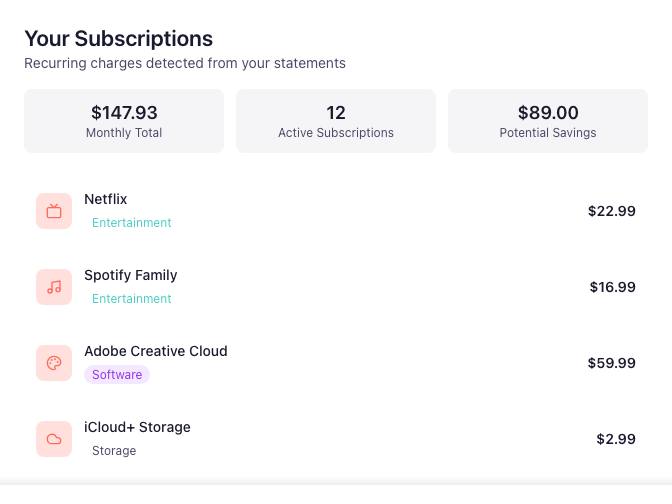
That last step has a name inside the app too: keep, cancel, or defer, one subscription at a time. That's the Unspending Spree, the guided challenge that gives the app its name.